On this page
Face Swap, Character Swap or Motion Control? Choose by What Must Stay
 Photo to Video
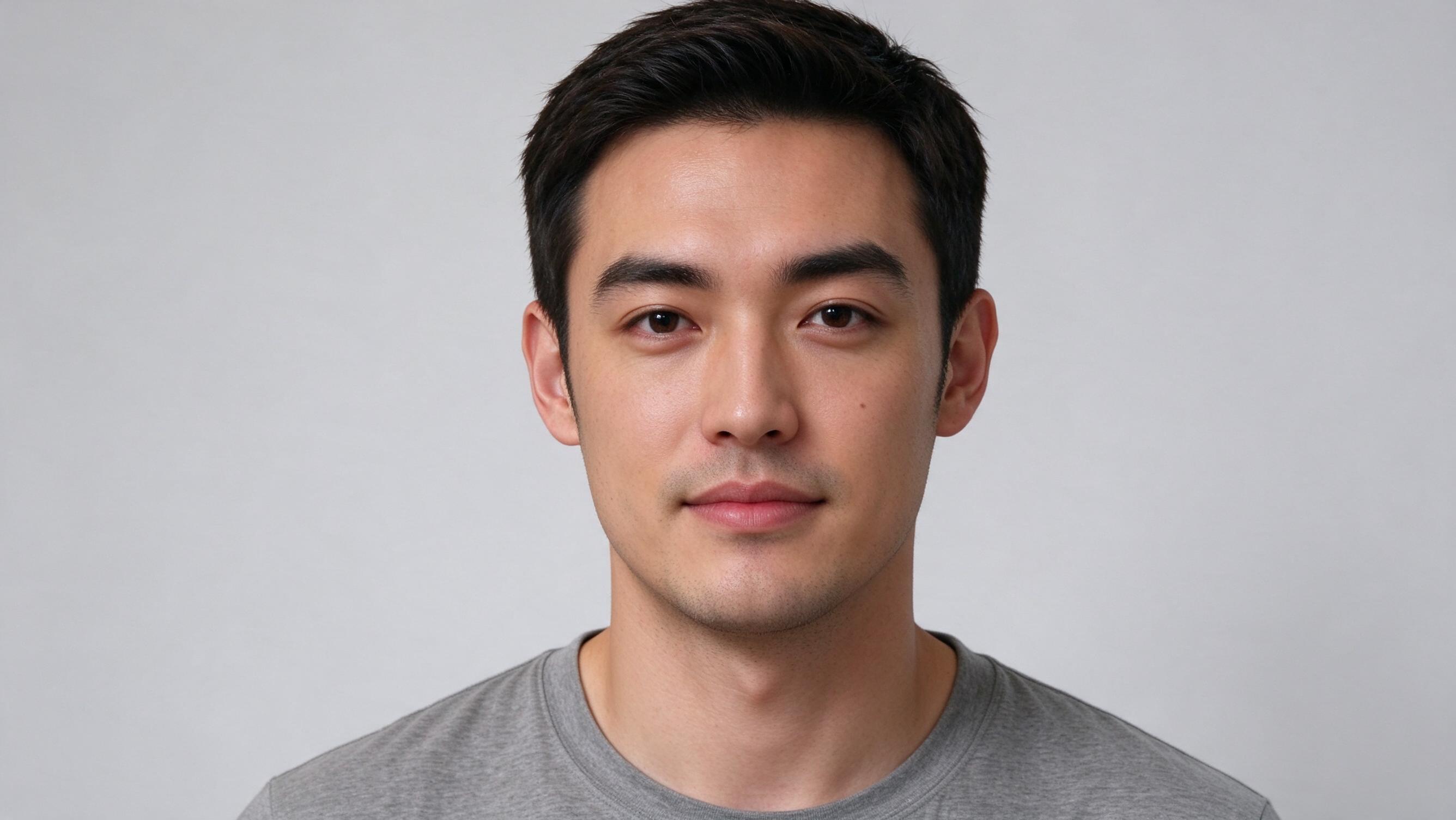
Choose a face swap when only facial identity should change, a character swap when the whole person should change inside an existing scene, and motion control when a performance video should drive your character. Start with the details you cannot afford to lose: the outfit, room, gestures, camera or dialogue.
These names describe common goals, not guarantees. Tools can overlap. This guide helps you choose inputs and judge the output; the character-swap tutorial covers the actual upload steps and complete examples.
Choose by what must stay
| Your requirement | Start with | Typical inputs | Check especially |
|---|---|---|---|
| Keep the body, outfit and scene; change the face. | Face swap | Source clip and face reference. | Identity, face boundaries, hair and skin transitions, untouched clothing. |
| Keep the scene and performance; replace the person, including their appearance. | Character swap | Source clip and replacement character reference. | Outfit changes, background drift, person assignment, action and timing. |
| Animate your chosen character using another performer’s movements. | Motion control | Character reference and a driving performance video. | Pose transfer, character consistency and which scene or camera the tool uses. |
A red dress that must remain in the original shot points toward a face-focused edit. A new presenter who can wear a different outfit points toward character replacement. An illustrated character that should perform a recorded dance points toward performance transfer.
Do not assume that motion control copies only the body motion, or always discards the camera and audio. For example, Runway’s Act-Two documentation describes a driving performance plus a character image or video, transferring movement, speech and expression. The exact behavior depends on the tool and input type; this is a documented workflow example, not a test or ranking by us.
The Photo to Video Recast page offers Character swap and Object swap. It has no separate face-only or motion-control mode. If either is your specific requirement, do not use whole-character replacement merely because both workflows accept a photo and a video.
Prepare inputs for the task
- Write the acceptance criteria first. For example: “Change the presenter; retain the room, product label, hand gesture and spoken line.” If the original clothes must also remain, reconsider whether a whole-character edit is suitable.
- Match the reference to the shot. A clear close-up helps evaluate facial identity; full-body movement needs useful body information. Keep important facial features visible and avoid a reference dominated by unrelated props or scenery.
- Use a short representative source. Include the difficult moment you actually care about, such as a turn, overlapping hand or another person crossing. A simple front-facing result does not establish performance on those harder moments.
- Record the selected workflow and settings. Keep the original inputs, actual file duration, resolution, quote and output. Different models behind similar page labels can produce different results; do not combine their observations into a single success rate.
A clean reference can make a comparison easier to interpret, but it is not a proven cure for scene changes. Changing both the model and reference in the same retry makes it harder to tell which caused the difference. Use images and clips you have permission to edit and share.
Check character-swap inputs and quote
What our existing samples establish
We reused existing tests for this guide; we did not run a controlled comparison of face-swap, character-swap and motion-control tools. The examples below concern character replacement only.
MiniMax: recognizable scenes and actions, changed details
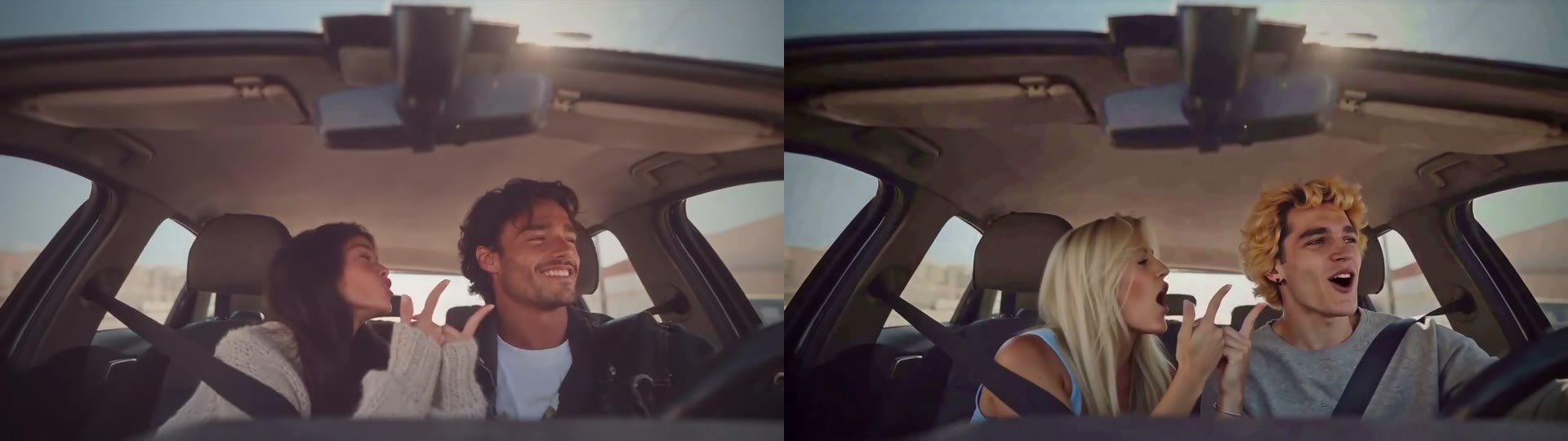
Our November 8, 2026 car and keyboard examples used MiniMax Recast. The room or car and broad gestures remained recognizable, while faces, hair and clothing changed. At 12 seconds in the car source, the driver grins; the result has a wider-open mouth. The keyboard background gains texture, and the original cap and wristbands are not retained as worn.
The full comparison below shows the car source on the left and result on the right, scaled to the same height without cropping. The page cover is a separate AI-generated portrait used as an input example; it is not a replacement result. See the full observations and video comparisons before judging the movement. These selected examples are not a measured success rate or a lip-sync validation.
OpenJutsu: a synthetic dialogue case with scene and timing changes
On November 12, a different test used a fictional, AI-generated speaking man as the source and an AI-generated woman at a sushi restaurant as the replacement reference. The request ran on OpenJutsu. The output brought in the restaurant scene and added an eating action absent from the source.
The video shortened from 10.04 to 9.42 seconds, and its audio track shortened too. It still contained dialogue, but synchronization was not established. The scene-rich reference is one possible contributor; no controlled reference-only retest established the cause. Do not interpret this as a MiniMax result or proof that a plain portrait fixes it.
You can inspect the complete synthetic dialogue source. Its own word-level synchronization is also unverified. The MiniMax and OpenJutsu examples used different inputs, so they cannot establish which model is better.
Compare the same source and output
Play both files at normal speed, then inspect matched moments at the same display height without cropping. If lengths differ, note that before comparing timestamps: the same timestamp need not represent the same action.
| Check | What to compare | Record |
|---|---|---|
| Identity and assignment | Start, middle, end and turns. With multiple people, confirm each reference stays on the intended person. | Timestamps of identity changes or assignments that switch. |
| Details that must stay | Your required outfit, logo, prop, background and accessories. | Preserved, changed or not visible enough to assess. |
| Movement and overlaps | Gesture timing, fast turns, hands near the face and people crossing. | Missing or added actions; visible distortion or flicker. |
| Camera and duration | Framing, camera path and actual file length. For motion control, check the tool’s stated behavior first. | Unexpected crop, zoom, view change or timing difference. |
| Audio and dialogue | Listen to the actual track and watch the speaking section. Check source alignment first. | Missing or altered audio; synchronization assessed separately. |
A few paused frames help locate visible differences but cannot prove stability throughout the video. Keep both complete files and a timestamped problem list. For a retry, isolate the change you are testing and check its current quote; a shorter test is not automatically cheaper on every pricing scheme.
A plausible mouth is not validated lip sync
Mouth appearance and speech synchronization answer different questions. A grin can become an open mouth while the broad expression remains recognizable. An audio track can survive while the timing changes. Neither observation tells you whether individual spoken sounds match the mouth.
Start with clear, audible speech and an unobstructed mouth. Check the source with sound, then the result at normal speed. Look for obvious early or late speech, missing words, or movement that stops while speech continues. Pauses, breathing and transitions between sounds complicate frame-by-frame judgments; a single open or closed mouth is not a pass or fail.
If the source is already misaligned, do not attribute all output mismatch to replacement. If you cannot assess synchronization, say so. Our existing character-replacement examples have not established dialogue lip-sync accuracy. See the sound and dialogue guide for the distinction between generated sound, narration and mouth timing.
Choose the next step
- Only the face may change: evaluate a dedicated face-focused workflow against your outfit and background requirements.
- The whole person may change: follow the character replacement tutorial and budget a representative test.
- A character should follow a performance: choose a tool with an explicit driving-video workflow and verify what it transfers.
- The scene or an object is the main target: read prompt-based video editing rather than starting with a face replacement.
For a fixed delivery budget, count attempts rather than only usable clips. The credit-budget guide separates retries from successful outputs; a result is ready only when it meets your acceptance criteria.
Explore prompt-based video editing
FAQ
Is a face swap the same as a character swap?
No. A face swap targets facial identity while aiming to retain the existing body and outfit. Character replacement redraws more of the person, so hair, clothes and body appearance can change. Neither label guarantees unchanged surrounding pixels.
Which workflow should I choose if the outfit must stay?
Start with a face-focused swap if only the face should change. Treat the outfit, hair and accessories as acceptance checks, not guaranteed preservation. A whole-character replacement is a poor fit if changes outside the face are unacceptable.
Does Photo to Video Recast have a face-only or motion-control mode?
The Recast page offers Character swap and Object swap. It does not offer a separate face-only or motion-control mode. Check the actual inputs and controls of any tool rather than treating these terms as interchangeable.
Does character replacement preserve lip sync?
Our examples have not established that. An audio track and recognizable mouth movements do not prove that the mouth matches each spoken sound. Check clear dialogue in the source first, then compare the output with sound at normal speed.
Why did the background change after a character swap?
The model can redraw more than the intended person. In one OpenJutsu sample, the reference image's restaurant scene appeared in the output, but we did not isolate the cause. A plain-background reference is a useful controlled test, not a proven fix.
Is the output always the same length as the input?
No. Our 10.04-second synthetic dialogue source returned a 9.42-second OpenJutsu output, with a shorter audio track too. Check the actual file durations before lining up sound or editing to a fixed timeline.