On this page
Wan Image to Video: Fast, Pro, Prime & a Tested Example
 Photo to Video
Wan has one card in the photo2video.ai model menu, but three buttons inside it, Fast, Pro and Prime, and they do not run the same model. Pro even changes model when you change resolution. That matters because each version gives you different controls: some let you pick an aspect ratio or an end frame, some let you switch sound off, and some stop at 15 seconds while others go to 30.
This guide maps each button to the model that actually runs, lists the controls you get with each, shows what they cost, and walks through one real Wan Pro generation with its result and its flaws.
Which Wan version actually runs
Pick Wan in "Choose an AI model", upload a photo, and you will see three buttons under the settings row. Here is what each one sends your photo to, as of October 28, 2026:
| Button you pick | Model that runs |
|---|---|
| Fast | Wan 2.6 Flash |
| Pro at 480p, 720p or 1080p | Wan 3.0 |
| Pro at 2K or 4K | Wan 2.7 Pro |
| Prime | Wan 3.0 Prime |
Two things to take from this table:
- The buttons are not quality steps. Fast, Pro and Prime are different models, from the Wan 2.6, 2.7 and 3.0 families, with different settings. Prime is not simply "Pro, but sharper."
- Pro is two models. Moving Pro from 1080p to 2K swaps Wan 3.0 for Wan 2.7 Pro, and the controls on the page change with it. More on that below.
When you first open /wan in a browser that has never used it, the page starts on Pro, 480p, 8 seconds, Original. After that it remembers what you used last, so check the settings row before each generation.
What each version lets you set
Fast (Wan 2.6 Flash)
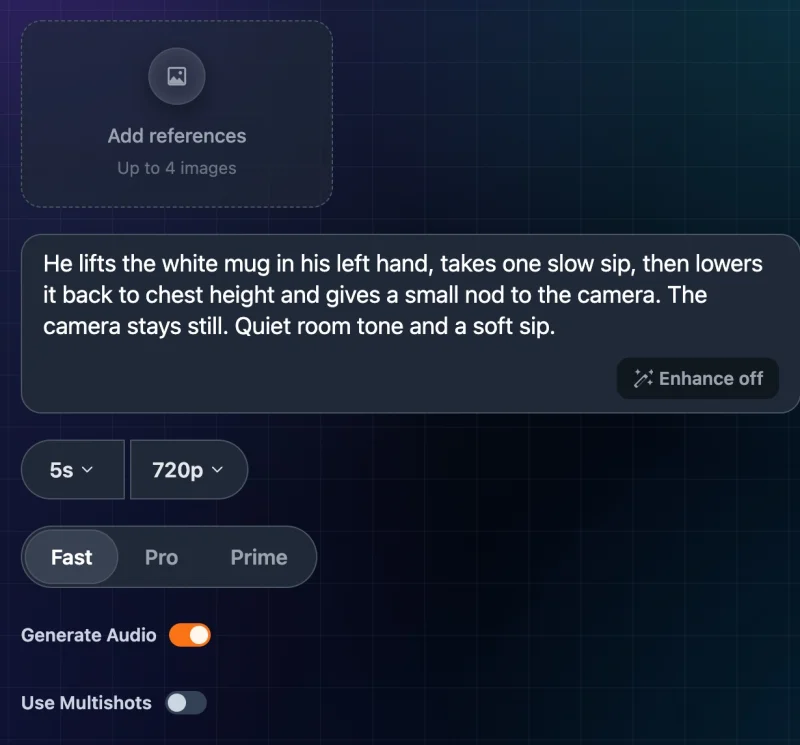
- Length: 5, 10 or 15 seconds.
- Resolution: 720p or 1080p.
- Aspect ratio: no menu. The model decides the frame shape.
- Sound: the only Wan version with a Generate Audio switch. Turning it off roughly halves the price.
- Use Multishots: asks for a clip built from more than one shot. Turning it on also turns Enhance on.
- End frame: not available.
Pro at 480p, 720p or 1080p (Wan 3.0)
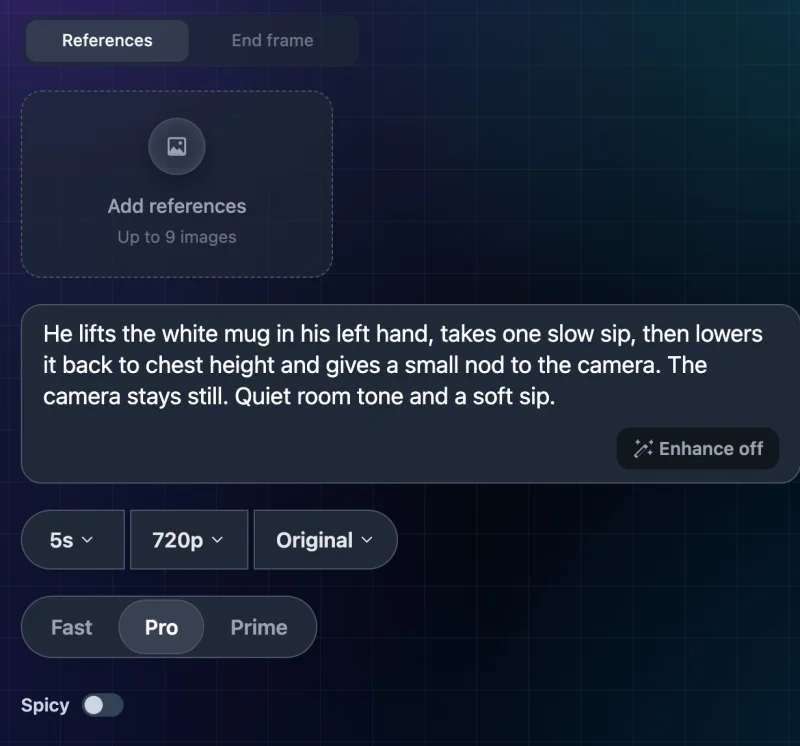
- Length: any whole number from 2 to 30 seconds.
- Resolution: 480p, 720p or 1080p.
- Aspect ratio: Original, 16:9, 9:16, 1:1, 4:3 or 3:4. Original lets the model choose the output ratio; it is not a promise to keep the exact framing.
- Sound: always on. There is no switch.
- End frame: yes, through the End frame tab.
- Spicy: a separate generation mode. This guide does not cover or test it.
Pro at 2K or 4K (Wan 2.7 Pro)
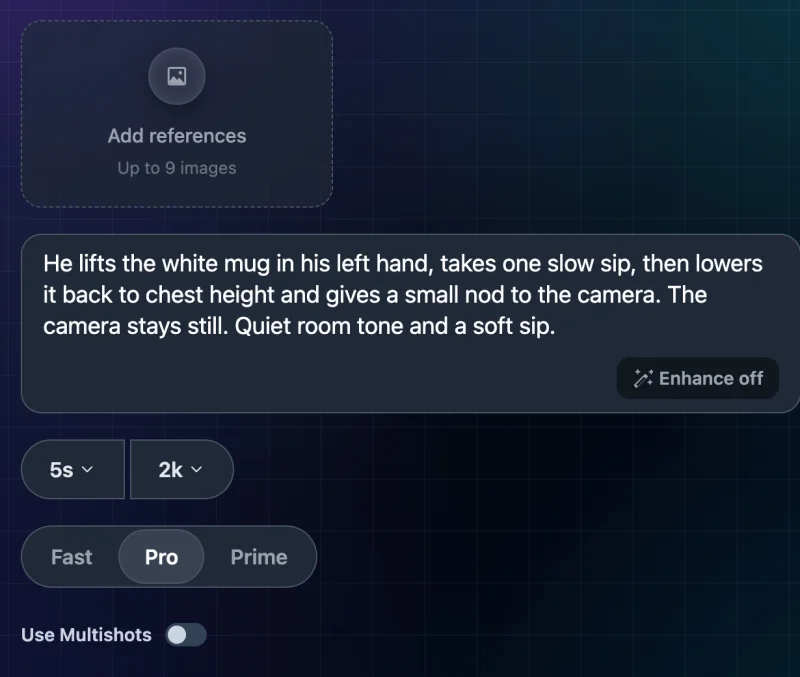
Pick 2K or 4K and the page changes:
- Length: back to 5, 10 or 15 seconds.
- Aspect ratio: the menu disappears.
- End frame: the tab disappears.
- Spicy: gone; Use Multishots appears instead.
- Sound: still always on.
If you set up an end frame or a 25-second length at 1080p and then switch to 2K, those options are no longer there. Check the settings again after changing resolution.
Prime (Wan 3.0 Prime)
- Length: 2 to 30 seconds.
- Resolution: 480p, 720p or 1080p. No 2K or 4K.
- Aspect ratio: the same six options as Pro.
- Sound: always on.
- End frame: yes.
- Spicy: a separate switch, not covered here.
Enhance
Every version has an Enhance button in the prompt box. Enhance enables prompt expansion, which can elaborate on your instructions before generation. Leave it off when you want to evaluate the prompt you wrote without that extra rewriting step. Turning it off does not guarantee exact prompt adherence.
Reference images change the model again
All three versions have an Add references box. Fast takes up to 4 extra images, and Pro and Prime take up to 9, on top of your main photo. Each thumbnail has a mention button that inserts a tag for that image into your prompt, so you can say which image a detail comes from.
Adding even one reference sends the job to a separate reference model, and the controls change:
| Version | With reference images |
|---|---|
| Fast | 5 or 10 seconds; 16:9 or 9:16 only; Enhance and Multishots disappear; Generate Audio stays |
| Pro | 480p to 1080p only (no 2K/4K); fixed ratios only, no Original; 2–30 seconds; no Spicy |
| Prime | 480p to 1080p; fixed ratios only; 2–30 seconds |
References and the end frame are separate tabs, so use one or the other. With references, your main photo becomes one of the reference images rather than a fixed first frame. We checked Fast and Pro reference controls in the interface; the Prime reference settings above were checked in the current product configuration, not in a generated test. For more on mixing several photos, see how to create a video from several photos.
What Wan costs in credits
These credit quotes were checked on October 28, 2026, using the same pricing calculation as the Make Video button. We also verified the Pro 480p and 720p quotes in the interface. All rows use 5 seconds, with sound on unless stated otherwise. Prices can change: check the current quote before submitting.
| Version and resolution | Credits for 5 s |
|---|---|
| Fast 720p / 1080p | 33 / 49 |
| Fast 720p / 1080p, sound off | 17 / 25 |
| Pro 480p / 720p / 1080p | 30 / 60 / 120 |
| Pro 2K / 4K | 105 / 120 |
| Prime 480p / 720p / 1080p | 62 / 126 / 252 |
Longer clips cost more; whole-credit rounding means the total may not scale exactly. Pro at 720p is 60 for 5 seconds, 120 for 10 and 360 for 30.
Pro at 2K costs less than Pro at 1080p. That is because they are different models with different rates, not because 2K is the better deal or the better picture. Pick by the controls you need.
Reference mode has its own prices. Pro and Prime cost the same as without references. Fast costs more: 75 credits for 5 seconds at 720p, compared with 33 without references.
Tested example: one Wan Pro clip
To show what one ordinary Wan Pro generation looks like, we ran a single test on the live site. We did not retry or pick the best of several.
Photo: a man in a beanie and grey T-shirt holding a white mug against a pink wall, 1600×1067 (3:2). The mug is in the original photo; the model did not add it.
Wan Pro: lifting a mug and taking a sip
Original image
Generated result
Prompt used: He lifts the white mug in his left hand, takes one slow sip, then lowers it back to chest height and gives a small nod to the camera. The camera stays still. Quiet room tone and a soft sip.
Result:
- Cost: 60 credits, the same as the quote on the button.
- Time: about 99 seconds from submit to finished video.
- Output: 1174×782 at 30 fps, 5.00 seconds of video (5.04 seconds including the audio track), with stereo audio. The "720p" setting gave a short side of 782 pixels, not exactly 720.
- Frame shape: both input and output are approximately 3:2, and the first frame has similar framing. This one result does not prove that Original preserves composition throughout a clip.
What went well:
- The actions happen in the order the prompt asks: he raises the mug at around 0.5–1.5 seconds, makes a sipping gesture, and lowers it back to chest height by about 3 seconds.
- We did not identify obvious extra or missing fingers in the sampled frames. The grip changes as the mug moves, so this is not a guarantee of hand accuracy.
- The camera and background stay still.
What to check in your own results:
- The mug changes. When he tips it up, the bottom of the mug shows printed markings that are not in the original photo. The model invented them. The mug's shape also shifts slightly after he lowers it.
- The sip is hidden. The mug covers his mouth during the sipping gesture, so you cannot see the lips meet the rim. The mug's angle matches his head position, but that is all the clip shows.
- The nod is barely there. If it happens, it is too small to confirm.
- Sound is very quiet. There is an audio track, but it is faint, and we cannot reliably say what it contains.
This is one generation from one photo with one setting. It does not tell you how Fast, Prime, Pro at 2K/4K, reference images, end frames or longer clips will behave. For an earlier Wan Fast test on a perfume bottle, from October 26, see our product photo to video guide.
How to make a Wan video from a photo
- Open the Wan generator and sign in. Eligible new users can receive welcome credits; check your balance and the generation quote.
- Upload your photo.
- Pick Fast, Pro or Prime using the table above.
- Set length and resolution. If you need an end frame or a specific aspect ratio, stay on Pro at 1080p or below, or use Prime.
- Optional: add an end frame or reference images, but not both.
- Write your prompt. Leave Enhance off to avoid the optional prompt-expansion step.
- Check the price on Make Video, then click it.
- When it finishes, play the whole clip before downloading. Look at hands, faces, held objects and any text.
New to this? Start with our step-by-step guide to turning a photo into an AI video.
Prompt ideas for Wan
We have not tested these prompts. They follow the same pattern as our test: a clear subject, a small visible action and an explicit camera instruction. Adapt the details to your photo.
- Portrait: "She turns her head slowly toward the camera, blinks once and gives a small smile. Her shoulders stay still. The camera stays still."
- Product: "The bottle rotates a quarter turn to the right on the table. Soft light moves across the glass. The camera stays still. No text appears."
- Pet: "The dog tilts its head to the left, then its ears lift slightly. The background stays still. The camera stays still."
- Landscape: "Clouds drift slowly from left to right. The water ripples gently. The trees sway a little. Slow push-in toward the horizon."
- Food: "Steam rises from the bowl in thin wisps. A spoon slowly lifts some noodles. The camera stays still."
Name which hand or side you mean, keep to one main action, and say what should stay still. More examples are in our image to video prompts guide.
Troubleshooting
- My end frame tab disappeared. You are on Fast or on Pro at 2K/4K. Switch to Pro at 1080p or below, or to Prime.
- There is no aspect ratio menu. Fast and Pro at 2K/4K do not have one. Fast with reference images offers only 16:9 and 9:16.
- I can't pick 20 seconds. Only Pro at 1080p or below and Prime go past 15 seconds.
- I can't turn sound off. Only Fast has a Generate Audio switch. Pro and Prime always include sound.
- The price jumped after adding a reference. Fast with references runs a different model and costs more.
- The video doesn't match my photo's framing. Original lets the model choose. Pick a fixed ratio if the shape matters, and check the first frame.
- Objects change shape or gain details. That happened in our test. Try smaller, slower actions and describe what should stay the same. These suggestions are not tested fixes, and they cannot guarantee that an object stays unchanged.
- Settings look different from last time. The site remembers your last choices. Check every setting before you generate.
FAQ
Is Wan Prime better than Wan Pro? Our one Pro test cannot establish which is better. Prime runs Wan 3.0 Prime and Pro runs Wan 3.0 (or Wan 2.7 Pro at 2K/4K). They are different models with different prices. Prime costs about twice as much as Pro at the same resolution and stops at 1080p.
Which Wan version is Wan 3.0? Pro at 480p, 720p or 1080p runs Wan 3.0. Prime runs Wan 3.0 Prime. Fast runs Wan 2.6 Flash, and Pro at 2K/4K runs Wan 2.7 Pro.
Can Wan make a 30-second video? Yes, on Pro at 1080p or below and on Prime. Fast and Pro at 2K/4K stop at 15 seconds.
Does Wan add sound? Pro and Prime always request generated audio; neither offers a sound-off switch. Fast lets you switch it off. In our one test the sound was very quiet.
Can I use an end frame with Wan? Yes, on Pro at 1080p or below and on Prime. Not on Fast or on Pro at 2K/4K.
How long does a Wan video take? Our 5-second Pro 720p test took about 99 seconds. Times depend on the model, resolution, length and queue.
Sources
- photo2video.ai /wan model menu and settings, checked October 28, 2026.
- WaveSpeed: Wan 3.0 image-to-video, Wan 2.6 image-to-video flash, Wan 2.7 image-to-video pro.
- fal: Wan 3.0 Prime image-to-video.