On this page
Kling vs Wan vs Seedance: One Portrait, Six Videos
 Photo to Video
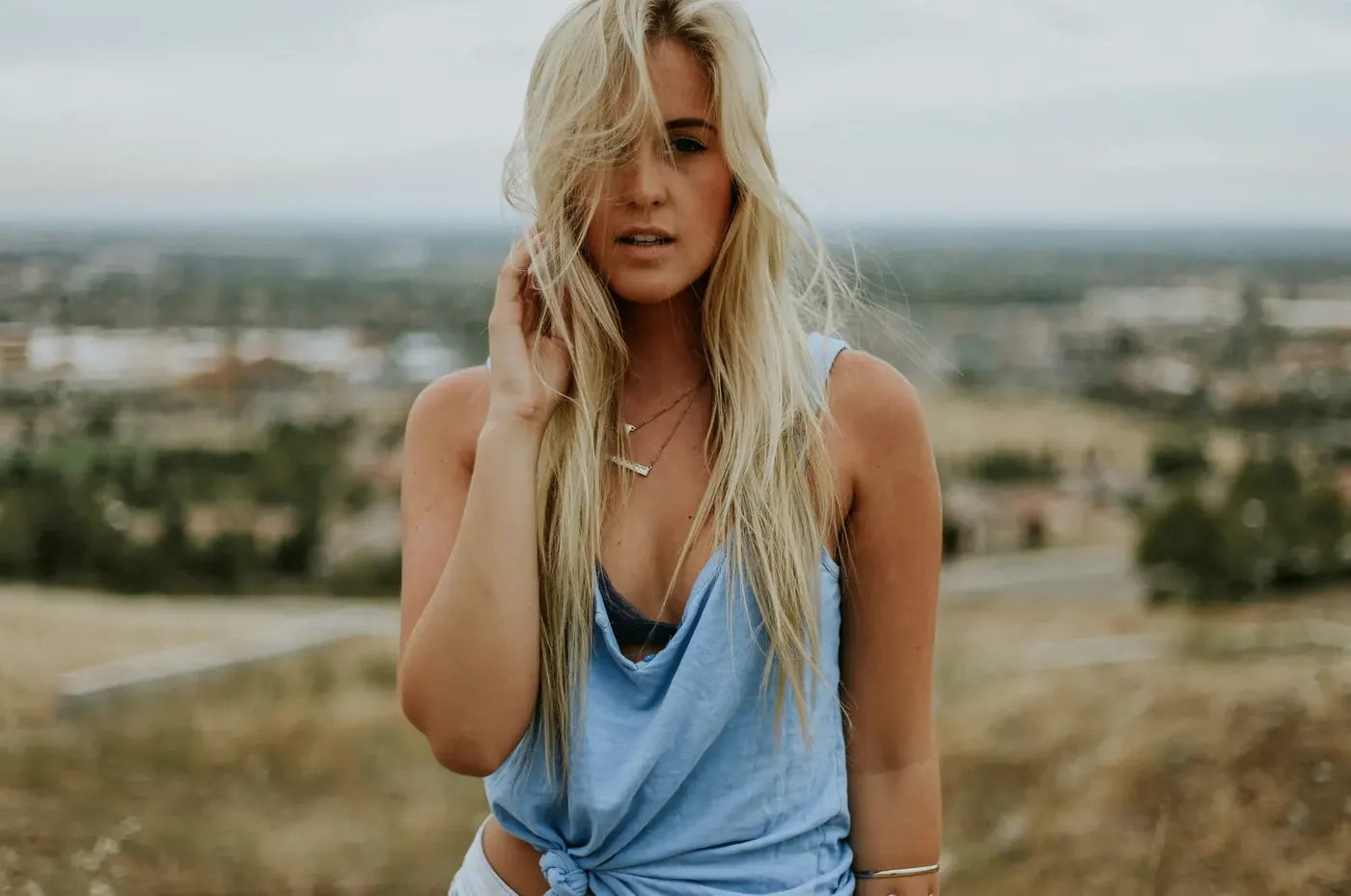
For this portrait, Kling Fast kept the expression and hair closest to the starting photo, Wan Pro made the smile more pronounced, and Seedance 2.0 Mini changed the framing and facial details more. Those are observations from two runs per preset, not a claim that one model is always better.
We used the same photo and prompt on Photo to Video on November 7, 2026. All six complete outputs are below, including the less faithful results. The total charge was 432 credits. This is our own product test, not an independent benchmark.
Which model should I try first?
Start with the result you need, then inspect the linked originals. The costs below are the recorded charges for these examples, not current quotes or a guarantee for your photo.
| Your priority | Example to inspect | Tradeoff in this test |
|---|---|---|
| A restrained portrait expression | Kling Fast portrait runs · 5 s, 720p selected · 84 credits each | More of the original expression and hair remained, but the small movement left hair across the face. |
| A stronger smile on a smaller budget | Wan Pro portrait runs · 5 s, 720p selected · 60 credits each | A broader smile and more exposed face; useful if you want that change, not an unchanged expression. |
| An exaggerated, timed reaction | Seedance Mini sushi test · 15 s, 720p · 216 credits | Bigger expressions followed the broad sequence, but some actions were early or missing. The portrait runs also changed framing and facial detail. |
| A long prompt with a move closer | Kling Pro sushi follow-up · 15 s, 1080p · 378 credits | Completed the long prompt and ended closer to the face, but missed the napkin and delighted finish. This was a different resolution from Wan and Seedance. |
The portrait test used two runs per preset on November 7; the sushi test used one finished run per variant on November 11–12. Neither establishes a general winner. For exact timing, unchanged identity or sound quality, these results do not establish a reliable choice. Review the full clips and test your own source.
Before generating, compare the dated credit quotes for common settings. A cheaper attempt is not necessarily a cheaper result you will keep.
What we tested
The source is the landscape portrait at the top of this page: 1400 × 929 pixels. Hair already covers part of the face and one hand is already near the hair. That starting pose makes this a narrow test of small portrait movements; it does not test walking, running, full-body motion or a new camera angle.
We selected Wan Pro (Wan 3.0), Seedance 2.0 Mini, and Kling Fast. Each used the 5-second and 720p selections, with the original photo proportions where offered. We added no end frame or extra reference images and did not use prompt enhancement. We ran each preset twice, consecutively, without replacement runs.
She slowly tucks her hair behind her ear and gives a soft smile to the camera while the wind gently moves her hair. The camera stays still.
We checked four things: changes in facial appearance, the requested hand-and-smile action, visible hand/hair artifacts, and framing/background changes. The initial review used frames at 0.3, 2.5 and 4.7 seconds; the editorial check sampled five frames per second across every clip. This is a visual assessment, not a biometric similarity score or certification that every frame is artifact-free.
The presets do not expose identical controls. Their frame rates, output shapes and audio behavior differ, so this compares the results of these site presets rather than isolating the underlying models under perfectly identical conditions. Audio tracks exist in all six files, but their content and quality were not evaluated. Seedance’s page offered no generation audio switch in this test; its demonstration player’s mute button is unrelated.
Open the full uncropped source photo to compare it with the output players.
Watch all six outputs
These are the complete output files, with no crop, speed change or added music. Players start muted; use their controls to play and inspect each run. The poster images are taken at 4.7 seconds.
Wan Pro · run 1
Wan Pro · run 2
Seedance 2.0 Mini · run 1
Seedance 2.0 Mini · run 2
Kling Fast · run 1
Kling Fast · run 2
What changed
Facial appearance and expression
Kling retained more of the source’s hair across the face and a restrained smile. Wan exposed more of the face and broadened the smile. Seedance smoothed facial texture and changed the apparent jaw and nose proportions, particularly in run 2. Compare the source with every output rather than treating a smiling face as automatically more faithful.

Open the full-size detail comparison for a closer look.
The requested action
All six sampled sequences show a hand moving near or through the hair and a smile developing, but the amount of motion varies. Kling run 1 is subtle and leaves hair covering part of the face. Seedance run 1 brings the other hand up. That is not a failure to follow this prompt: we did not specify which hand to use. If clearing the face is essential, judge that action separately from how closely the face resembles the photo.
Hands, hair and framing
We did not spot obvious broken hand shapes in the reviewed samples. That does not rule out brief defects between sampled frames. Watch the full clips at normal speed and inspect the hand/hair contact before using a result.
Wan and Kling kept approximately the source’s landscape proportions and composition. Both Seedance files are 1112 × 834, a 4:3 frame, so less of the scene is visible at the sides and the subject appears closer. The background remains broadly recognizable in all six. The changed frame shape makes face comparisons less controlled and matters if your edit needs the original composition.
Cost, time and file sizes
These are the actual quotes and matching charges for these runs, not permanent prices. Waiting time was measured from clicking Make Video until the result appeared; it includes more than model processing alone.
| Run | Credits | Wait | Output |
|---|---|---|---|
| Wan Pro · run 1 | 60 | About 120 s | 1178 × 782; 30 fps; 150 frames; 5.04 s |
| Wan Pro · run 2 | 60 | About 160 s | 1178 × 782; 30 fps; 150 frames; 5.04 s |
| Seedance 2.0 Mini · run 1 | 72 | About 130 s | 1112 × 834; 24 fps; 121 frames; 5.09 s |
| Seedance 2.0 Mini · run 2 | 72 | About 110 s | 1112 × 834; 24 fps; 121 frames; 5.09 s |
| Kling Fast · run 1 | 84 | About 50 s | 1176 × 780; 24 fps; 121 frames; 5.04 s |
| Kling Fast · run 2 | 84 | About 130 s | 1176 × 780; 24 fps; 121 frames; 5.04 s |
Two runs at 60 credits, two at 72, and two at 84 total 432 credits. Wan was cheapest in this set. Kling run 1 appeared after about 50 seconds, but its second run took 130 seconds, so this sample does not establish a reliable speed ranking. The selected 720p label also did not mean every export was exactly 1280 × 720.
To turn this six-run bill into a planning example, see how to budget credits for ten kept clips. The retry counts there are assumptions, not a success rate measured here.
To focus on eyes and mouth rather than model comparison, follow our face-animation walkthrough, with a separate single-run blink and smile example.
Repeat the test on your photo
- Choose a clear photo with the face and the intended movement visible. Keep the same source file for each preset.
- Use one modest action and a camera instruction. Start with the prompt above, or adapt the examples in our image-to-video prompt guide.
- Check the displayed credit quote and export shape. For this workflow, selecting the same nominal resolution did not produce identical dimensions.
- Compare every result, including the weaker ones. Check expression, the requested action, fingers, hair, framing and duration before deciding what to keep.
If you want a stronger smile, the Wan results here show that tradeoff. If you want less change to this starting expression, the Kling results are closer in this small sample. For a different portrait or movement, repeat a short test; two runs do not give a success rate. For replacing a person in an existing moving video, use the separate character-swap workflow.
FAQ
Which model kept the portrait closest to the photo?
In our two runs per preset, Kling retained more of the expression and hair; Wan strengthened the smile, while Seedance changed detail and framing more. One portrait and prompt cannot establish a general ranking.
Does keeping the face similar mean the action worked?
No. Check appearance and action separately. Kling run 1 changed less but left hair across the face; Wan produced a broader smile. Decide whether you need the original expression, stronger motion or both.
How much did the six videos cost?
432 credits: two runs each at 60 (Wan), 72 (Seedance) and 84 (Kling), using 5-second, 720p settings. These are recorded test costs; check current button quotes.
Were all six videos exactly the same size?
No. Wan returned 1178×782, Kling 1176×780, and Seedance 1112×834. Seedance returned a 4:3 frame while the other two stayed close to the source proportions. Matching menu labels did not produce matching dimensions.
Did you retry until you got a good result?
No. We generated two consecutive runs per preset and include all six outputs. We did not select a best take or generate replacements.
Does this test compare audio quality?
No. All six files contain audio tracks, but we did not evaluate their content or quality. Player mute controls are separate from generation settings.
Will the same prompt give me the same result?
Not necessarily. Even the two runs of each preset differed in movement and waiting time. Test your own source photo and review the complete output before using it.
For a different source image and a longer action sequence, see our 15-second timed-prompt test, with full outputs and the actual charges.