On this page
How to Use LTX 2.5 for Image to Video
 Photo to Video

LTX 2.5 is Lightricks' newest video model, and on Photo to Video it is the cheapest way to get native 4K. It makes the picture and the sound in the same pass, so a person in your photo can speak, and it renders 4K directly rather than upscaling a smaller video.
Most "LTX image to video" tutorials show you how to run it yourself: install ComfyUI, download the model files and find a graphics card with enough memory. This guide skips all of that. It shows how to use LTX 2.5 in your browser to turn a photo into a video: which resolution and length to pick, how to write a prompt for motion and sound, what it costs, where it falls short, and one real 4K generation we ran without retries.
Photo to Video is not the official LTX website and is not affiliated with Lightricks. We run LTX 2.5 through official API partners, so you need no LTX account and no hardware of your own.
LTX 2.5 at a glance
As of November 2, 2026, this is what you get when you pick LTX 2.5 on Photo to Video:
| Setting | LTX 2.5 |
|---|---|
| Tiers | One |
| Resolution | 720p, 1080p, 2K or native 4K (no 480p) |
| Length | 5 to 20 seconds |
| Sound | Always on, included in the price |
| 5-second price | 90 credits (720p) to 297 credits (4K) |
| Aspect ratio | Follows your photo |
| Extras | End frame (optional). No reference images |
Why pick LTX 2.5? Two reasons: 4K and length. Five seconds of 4K costs 297 credits here, less than any other model on the site that renders 4K natively, and a single clip can run up to 20 seconds.
Why not? It has no cheap draft setting. The lowest option is 720p at 90 credits, and it does not take reference images.
Run LTX 2.5 online, without ComfyUI or a GPU
LTX 2.5 is an open-weights model, so you can download it and run it yourself. That route suits people who already use ComfyUI and own a powerful graphics card. For everyone else, it means installing software, downloading large model files and waiting on your own hardware, especially at 4K.
On Photo to Video the model runs on our partners' servers. You upload a photo, type a prompt and get a video back in the browser, on a laptop or a phone. You pay per video with credits instead of buying hardware, and other models such as Seedance, Kling and MiniMax H3 sit in the same menu if a shot doesn't work on LTX.
Resolution and length
Resolution. All four sizes come from the same model; only the detail changes.
- 720p (90 credits for 5 s): use it to check whether the motion and sound work. It is the cheapest LTX clip.
- 1080p (126): enough for phone viewing and most social posts.
- 2K (189): for larger screens or if you plan to crop.
- 4K (297): for big screens, heavy cropping or footage that will be edited with other 4K material. This is where LTX 2.5 is the best value on the site.
Length. Prices are per second, so 10 seconds costs twice 5 seconds and 20 seconds four times.
- 5 seconds fits one action and one short spoken line. Start here.
- 8 to 12 seconds fits a few actions in a row or a short exchange.
- 20 seconds is the maximum, longer than most models on the site manage in one go. Longer clips give the model more room to drift, so check faces and hands closely.
A cheap way to work: get the prompt right at 720p and 5 seconds, then run the same photo and prompt at 4K. Results differ from run to run, so the 4K version won't match the draft frame for frame, but a prompt that works usually keeps working.
Is LTX 2.5 free?
Not on the free credits alone. Many people search for "free LTX 2.5", so here is the exact answer:
- New accounts get 50 free credits. The cheapest LTX 2.5 clip, 5 seconds at 720p, costs 90, so the free credits don't cover one.
- The free credits do cover other models. A 5-second Seedance 2.0 Mini clip at 480p is 36 credits, and a 5-second MiniMax H3 Fast clip at 480P is 15. Use them to test your photo and prompt first.
- After that you pay with credits. There is no subscription; you pay per video.
The exact price is shown on the Make Video button before anything is spent. More on how free credits work is in our free image to video guide.
What LTX 2.5 costs
Credits per clip, as of November 2, 2026. Sound is always included.
| Resolution | 5 seconds | 10 seconds | 20 seconds |
|---|---|---|---|
| 720p | 90 | 180 | 360 |
| 1080p | 126 | 252 | 504 |
| 2K | 189 | 378 | 756 |
| 4K | 297 | 594 | 1,188 |
4K compared with other models on the site (5 seconds, native 4K):
| Model | Credits |
|---|---|
| LTX 2.5 | 297 |
| Seedance 2.0 Mini | 360 |
| Seedance 2.5 | 1,620 |
Prices can change, so check the button before you click.
Choose the right photo
At 4K, the photo matters more than usual: the video can't add sharpness the photo doesn't have.
- Use a large, sharp photo. A small or blurry image will still look soft at 4K. A photo from a recent phone is usually fine.
- Frame the photo the way you want the video. LTX 2.5 has no aspect ratio menu; the video takes the shape of your photo. Crop to 9:16 before uploading for TikTok or Reels, or 16:9 for YouTube.
- Pick a scene with a sound source. Because the sound is always on, photos with a person who can speak, an instrument, traffic, water or a busy room make the most of it.
- Show what you want to keep. If part of a face or a product is out of frame, the model has to invent it.
How to write an LTX 2.5 prompt
LTX 2.5 makes the picture and the sound together, so cover both:
- The action, in order. "He smiles, leans forward a little, then says…"
- The line, in quotes. Write the exact words someone should say and how they say them: "says in a friendly voice: 'Hey! What can I get you today?'"
- The camera. "The camera stays still" or one simple move, such as a slow push-in.
- The sound. Name the background sounds you want, and add "No music" if you don't want any. Otherwise the model chooses.
A simple pattern:
[Person] [does main action], then says in a [tone] voice: "[short line]." The camera [stays still / slowly pushes in]. Sound: [background]. No music.
Keep lines short. One short sentence fits in 5 seconds. For longer lines, choose a longer clip.
For more prompt patterns, see our image to video prompts guide.
How to make an LTX 2.5 video from a photo
- Open LTX 2.5 on Photo to Video and sign in.
- Upload your photo, already cropped to the shape you want.
- Pick the resolution: 720p, 1080p, 2K or 4K. The page opens on 720p.
- Pick the length. Use 5 seconds for a first try.
- Optional: add an end frame if you want the clip to finish on a second photo.
- Write your prompt: the action in order, any line in quotes, the camera and the sound.
- Check the price on Make Video, then click it.
- Watch the whole result with sound before downloading. Check the face, the hands and whether the words match the lips.
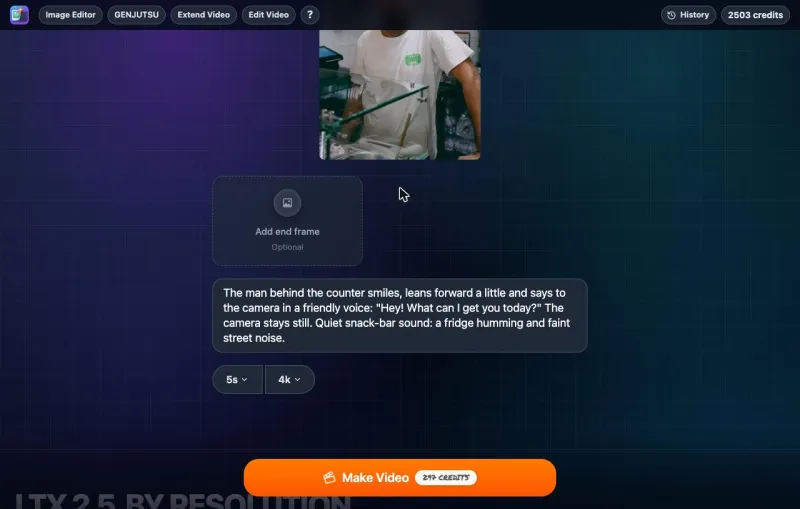
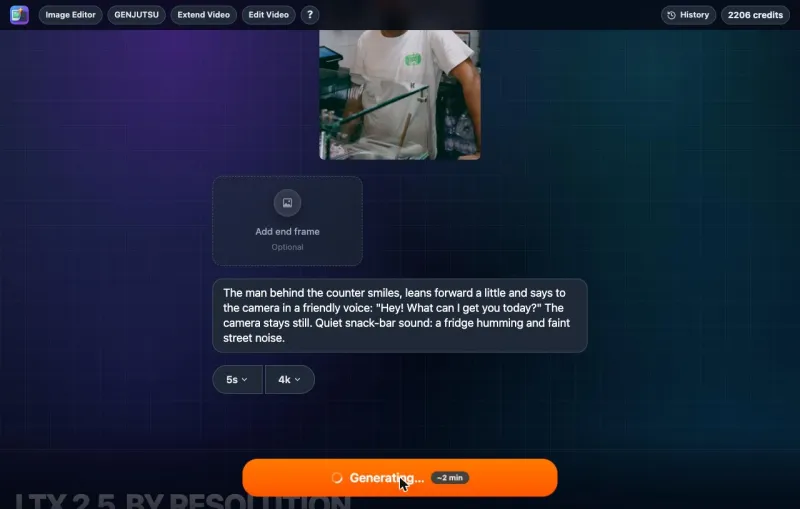
New to image to video? Our step-by-step guide to turning a photo into an AI video covers the basics.
End frames, and what LTX 2.5 can't take
- End frame: add a second photo and the clip will try to finish on it. This suits a planned change, such as a product turning around, more than a free-moving scene. We did not test it for this guide.
- No reference images. You can't add extra photos of a person or product for the model to keep consistent. If you need that, use Seedance or Kling; see our Seedance guide and Kling guide.
Tested example: a shopkeeper says one line, in 4K
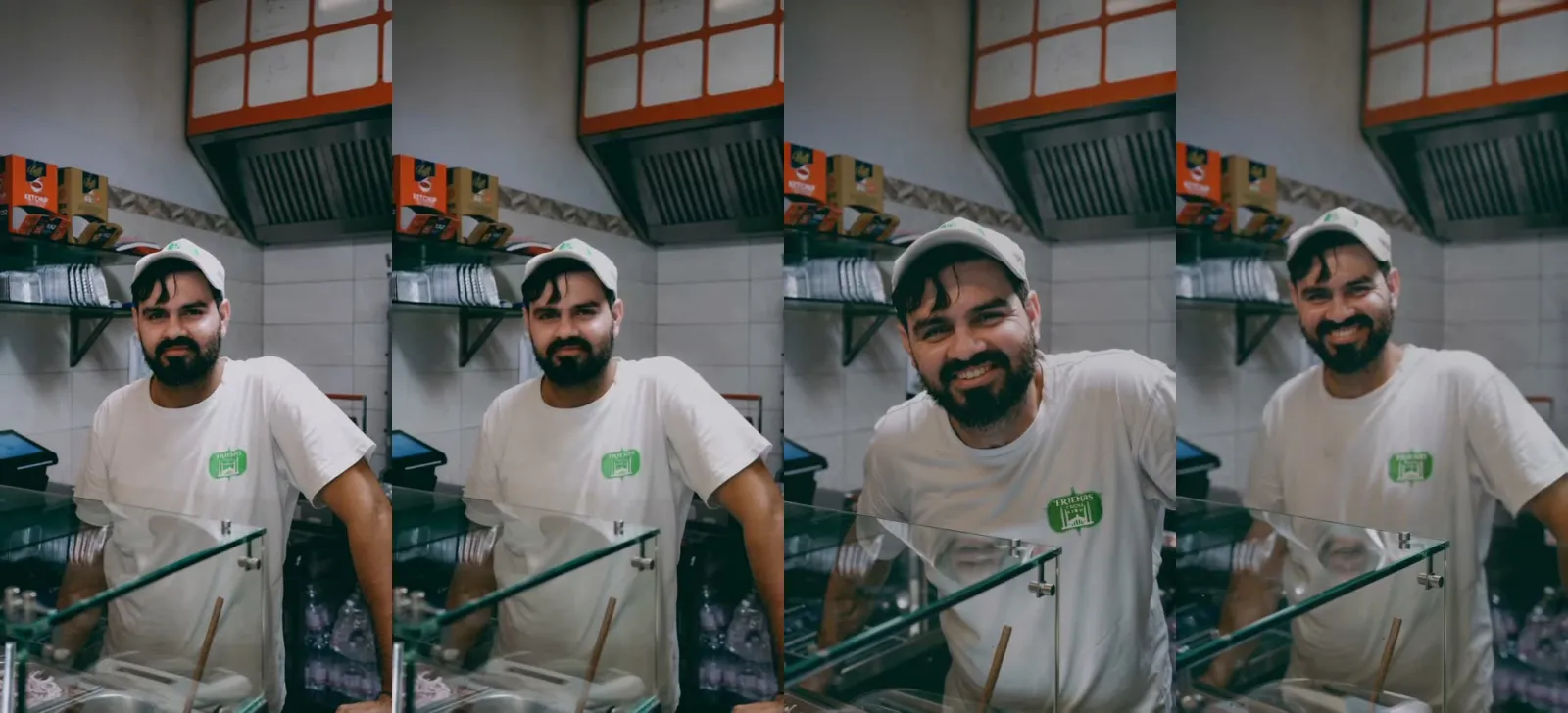
To show an ordinary LTX 2.5 result, we ran one generation on the live site at 4K and 5 seconds, with no end frame. We did not retry or pick the best of several. The photo is a man in a cap behind the glass counter of a small snack bar, looking at the camera, 2159×3840 (about 9:16). Turn the sound on when you play the clip.
LTX 2.5 in 4K: a snack-bar owner says one line
Original image
Generated result
Prompt used: The man behind the counter smiles, leans forward a little and says to the camera in a friendly voice: "Hey! What can I get you today?" The camera stays still. Quiet snack-bar sound: a fridge humming and faint street noise.
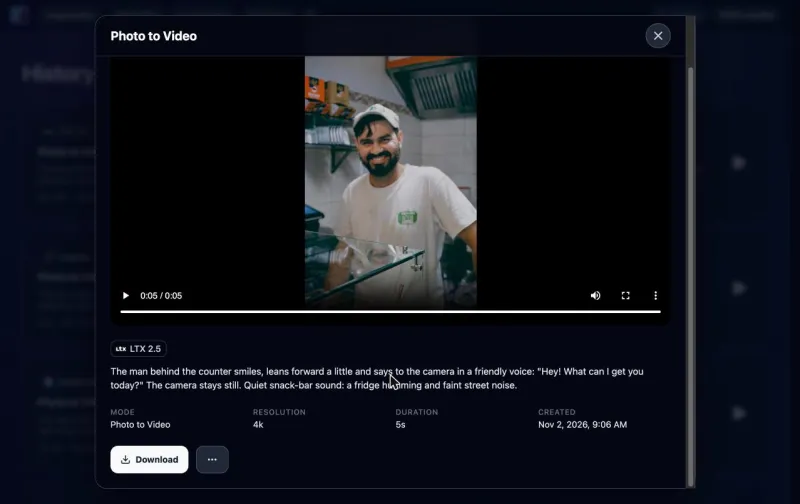
- Cost: 297 credits, the same as the price on the button.
- Time: 5 minutes 19 seconds from clicking Make Video to the finished video. The button estimated about 2 minutes, so plan for a longer wait at 4K.
- Output: 2112×3840 (vertical 4K) at 24 fps, 5.0 seconds, with a stereo audio track. The shape matches the photo.
What happened:
- He said the line, word for word. "Hey!" comes at about 1.6 seconds and "What can I get you today?" from about 2.8 to 3.8 seconds, and his mouth moves with the words. A speech-to-text check of the audio returned exactly "Hey! What can I get you today?"
- The action worked, but bigger than asked. He smiles, leans toward the camera, speaks, then leans back. The prompt said "a little"; he leans in far enough that his face fills much more of the frame.
- The camera stayed still. The shelves and the hood behind him stay in place.
- The detail really is 4K. At full size you can see single beard hairs, skin texture and his teeth. The background was out of focus in the photo and stays soft; 4K does not sharpen what the photo blurred.
- He stays the same person. Same face, beard, cap and shirt from start to finish.
- The background sound is loud, not quiet. Before and after the line there is a loud, rushing noise, about as loud as his voice, that drops away while he speaks. It is closer to a busy street than "a fridge humming and faint street noise". If you want quiet ambience, say so plainly and consider lowering it in an editor.
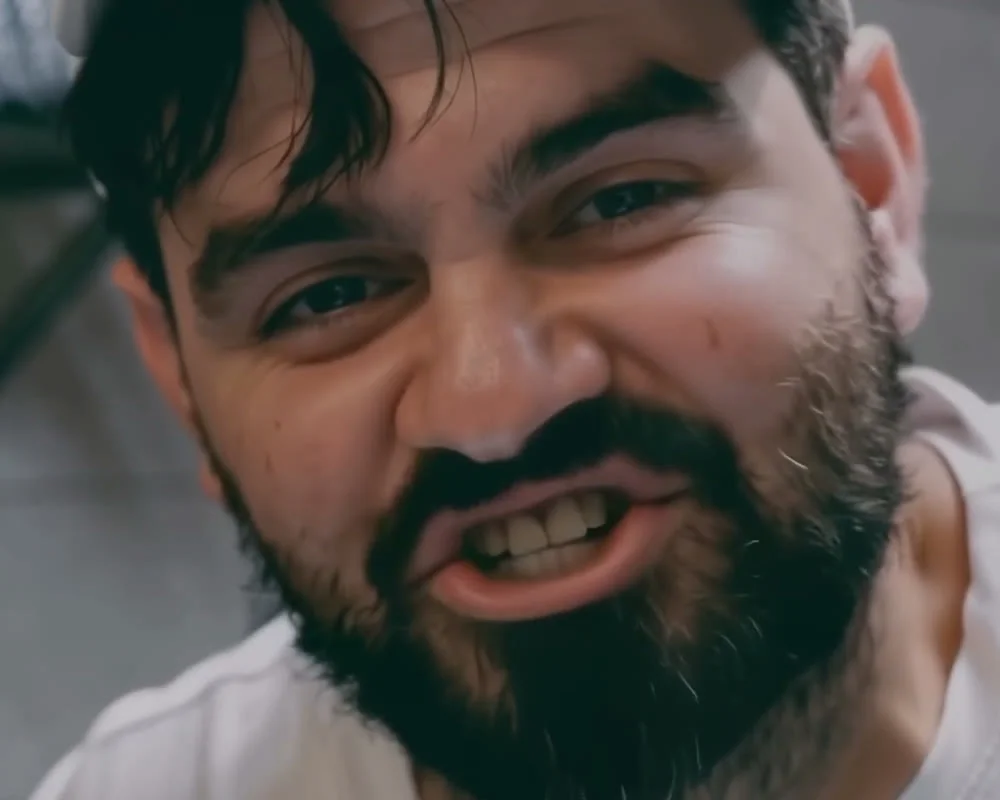
What to watch out for: small text gets garbled
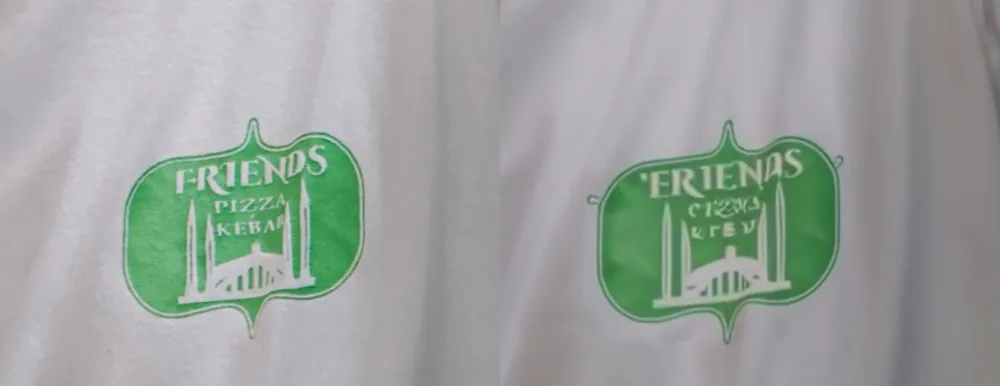
The green logo on his T-shirt reads "Friends Pizza Kebab" in the photo. In the video the shape and the drawing stay the same, but the words are garbled from the first second: the top line becomes "ERIENAS" and the two small lines turn into letter-like marks that don't spell anything. The reflections in the glass counter also shift and bend as he moves. Check logos, text and reflections before you post a clip, especially at 4K where people can see them clearly.
This is one generation from one photo at one setting. It does not show how LTX handles 20-second clips, end frames or long lines.
Prompt ideas for LTX 2.5
These prompts are untested. They follow the same pattern as our test: one subject, actions in order, a short line in quotes where it fits, a camera instruction and a sound line.
| Photo | Prompt idea (untested) |
|---|---|
| Product close-up in 4K | "She turns the watch slowly so the dial catches the light, then smiles at the camera. The camera slowly pushes in. Sound: a soft tick, a quiet room. No music." |
| Street musician | "He strums the guitar and sings the first line into the microphone. People walk past behind him. The camera stays still. Sound: acoustic guitar, his voice, street chatter." |
| Landscape | "Clouds drift over the mountains and the grass ripples in the wind. The camera pans slowly to the right. Sound: wind and distant birds. No music." |
| Toast | "He raises his glass toward the camera and says, 'To the new place!' The friends behind him cheer. The camera stays still. Sound: his voice, glasses clinking, happy chatter. No music." |
| Longer scene (10 to 15 s) | "The baker pulls a tray of bread from the oven, sets it on the counter, breathes in and says, 'Perfect.' Then she looks up at the camera and laughs. The camera stays still. Sound: oven door, tray on steel, her voice. No music." |
What LTX 2.5 does badly
- No cheap draft. There is no 480p; the cheapest clip is 90 credits, more than the free credits.
- No reference images. It can't keep a character or product consistent from extra photos.
- No aspect ratio menu. The video takes your photo's shape. Crop before uploading.
- No sound-off option. Every clip has audio. Mute or replace it after downloading if you only want the picture.
- 4K is slow. Our 5-second 4K test took 5 minutes 19 seconds, much longer than the estimate on the button.
- Background sound can come out too loud. We asked for quiet ambience and got a loud rush of noise around the spoken line.
- Small text gets garbled. The words on a T-shirt logo turned into made-up letters, and glass reflections bent as the person moved.
- Movement can be bigger than asked. "Leans forward a little" became a big lean toward the camera.
Troubleshooting
- I can't find 480p. LTX 2.5 doesn't have it. 720p is the lowest.
- The price is higher than I expected. Check the length and resolution. 5 seconds at 720p is the cheapest option.
- My video is the wrong shape. LTX 2.5 uses your photo's shape. Crop to 9:16, 16:9 or 1:1 before uploading.
- The 4K video looks soft. Use a larger, sharper photo. The model can't recover detail the photo doesn't have.
- The line is cut off or rushed. Shorten it, or make the clip longer.
- I hear music I didn't ask for. Add "No music." to the end of the prompt.
- I can't add reference images. LTX 2.5 doesn't take them; use Seedance or Kling.
- It's taking much longer than the button says. At 4K, our 5-second clip took over 5 minutes. Leave the page open or check History later.
- The background is too loud. Describe the sound you want plainly ("very quiet room, no street noise"), or turn the background down in an editor. (Untested suggestion.)
- A logo or text on clothing changed. Small printed text is often garbled. Pick a photo without small text, or check the clip before posting.
FAQ
Is LTX 2.5 free?
Not on the free credits alone. New accounts get 50 credits, and the cheapest LTX 2.5 clip is 90. There is no subscription; you pay per video.
Can I use LTX 2.5 online without ComfyUI?
Yes. On Photo to Video, LTX 2.5 runs in your browser. You don't install ComfyUI, download model files or need a graphics card.
Does LTX 2.5 make 4K video?
Yes, native 4K. Five seconds costs 297 credits, the lowest price for native 4K on the site. Our 5-second 4K test from a vertical photo came out at 2112×3840.
How long does LTX 2.5 take?
Our 5-second 4K clip took 5 minutes 19 seconds. Lower resolutions are faster.
How long can an LTX 2.5 video be?
5 to 20 seconds.
Does LTX 2.5 generate sound?
Yes, always. Speech, effects and background sound are made together with the picture, and the price includes them.
Is LTX 2.5 the same as LTX 2?
LTX 2.5 is the newer version, released by Lightricks in August 2026. It is the only LTX model on Photo to Video.
Can I use reference images with LTX 2.5?
No. You can add an end frame, but not reference images.
Is this the official LTX website?
No. Photo to Video is an independent product that runs LTX 2.5 through official API partners. We are not affiliated with Lightricks.
Ready to try it with your own photo?
Sources
- Photo to Video LTX 2.5 generator: settings and prices, checked November 2, 2026.
- One test generation on the live site, November 2, 2026, described above.
- Lightricks, the developer of LTX: lightricks.com.