On this page
How to Use MiniMax H3 for Image to Video
 Photo to Video
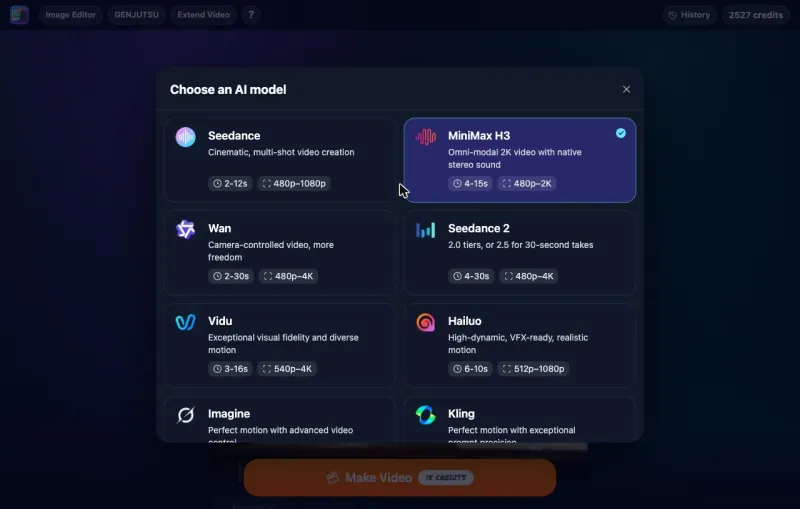
MiniMax H3 is the third generation of the model family behind Hailuo, and its headline feature is sound. Dialogue, sound effects and room tone are generated in the same pass as the picture, so a person in your photo can say a line and you hear it while their lips move, instead of getting a silent clip with audio added later.
This guide shows how to use MiniMax H3 on Photo to Video to turn a photo into a video: which of the three tiers to pick, which resolution and length to choose, how to write a prompt for both motion and speech, what it costs, what it does badly, and one real generation we ran without retries.
Photo to Video is not the official MiniMax website. We run MiniMax H3 through official API partners, so you use it in your browser like any other model on the site, with no MiniMax or Hailuo account.
MiniMax H3 at a glance
As of November 1, 2026, this is what you get when you pick MiniMax H3 on Photo to Video:
| Tier | Resolution | Length | 5-second price (credits) |
|---|---|---|---|
| Fast | 480P or 768P | 5 to 15 seconds | 15 (480P), 24 (768P) |
| Standard | 480P or 768P | 5 to 15 seconds | 30 (480P), 48 (768P) |
| Pro | 768P or 2K | 4 to 15 seconds | 90 (768P), 126 (2K) |
On every tier:
- Aspect ratio follows your photo. There is no ratio menu, so crop the photo to the shape you want before uploading.
- Sound is always on, with no switch. Every clip has audio.
- Input is a photo and a prompt. The generator also shows optional reference images and an end frame; see Reference images and end frames.
Is MiniMax H3 the same as Hailuo? It is the next generation of the same line. MiniMax calls it MiniMax H3 everywhere except its consumer app, which still says Hailuo. The previous generation, Hailuo 2.3, is still a separate entry in our model menu; see our Hailuo guide.
Fast, Standard or Pro: which tier to pick
All three tiers run the same H3 model through different hosts. They differ in speed, price and top resolution, not in the kind of video they make.
- Fast (the default): the cheapest and quickest. Use it to try a photo and a prompt. Our test on Fast was ready in about 20 seconds.
- Standard: the same 768P ceiling as Fast, a little slower and twice the price. Move up to Standard when Fast gets the idea right but misses details in a long prompt.
- Pro: the only way to get 2K, and the only tier that also offers 4-second clips. It costs several times as much and takes about two minutes. Use it for the final version once you know the prompt works.
A cheap way to work: draft on Fast at 480P, then make the final on Standard at 768P or Pro at 2K with the same photo and prompt. Every run is different, so the final will not match the draft shot for shot.
Resolution and length
Resolution. 480P is fine for checking motion and sound. 768P is the most you get on Fast and Standard and suits phone viewing. Pick 2K on Pro only when the clip is going on a big screen or will be cropped.
Length. Prices are per second, so a 10-second clip costs twice a 5-second one.
- 5 seconds fits one action and one short spoken line. Start here.
- 8 to 10 seconds fits two or three actions in a row, or a short exchange.
- 15 seconds is for a small scene. The longer the clip, the more room the model has to drift: faces can change and objects can morph.
Check the length before you click. The length menu may not be on 5 seconds when you open the generator. If you only need 5 seconds, set it first.
Is MiniMax H3 free?
Partly. Many people search for "MiniMax H3 free," so here is the exact answer:
- New accounts get 50 free credits. That covers three 5-second Fast clips at 480P (15 credits each), or two at 768P (24 each).
- After that you pay with credits. There is no subscription and no card needed to start, but it is not unlimited.
- You sign in once with Apple or Google so the credits are tied to an account.
The exact price is shown on the Make Video button before anything is spent. More on how free credits work is in our free image to video guide.
What MiniMax H3 costs
Credits per clip, as of November 1, 2026. Sound is always included.
| Tier and resolution | 5 seconds | 10 seconds | 15 seconds |
|---|---|---|---|
| Fast 480P | 15 | 30 | 45 |
| Fast 768P | 24 | 48 | 72 |
| Standard 480P | 30 | 60 | 90 |
| Standard 768P | 48 | 96 | 144 |
| Pro 768P | 90 | 180 | 270 |
| Pro 2K | 126 | 252 | 378 |
Each tier and resolution has a flat per-second rate, so 10 and 15 seconds cost exactly two and three times the 5-second price. Prices can change; check the button before you click.
Choose the right photo
MiniMax H3 shines when someone in the photo can speak or something in the scene makes a sound. Good choices:
- A person facing the camera: a shopkeeper, a presenter, a friend raising a glass. A clear view of the mouth gives the lip movement something to work with.
- A scene with a sound source: a café, a street, a kitchen, a beach.
- An action with a sound: clapping, pouring, typing, playing an instrument.
Tips that help with any model:
- Frame the photo the way you want the video. The clip takes its shape from your photo. Crop to 9:16 before uploading for TikTok or Reels, or 16:9 for YouTube.
- Show what you want to keep. If a face is half out of frame, the model invents the rest.
- Leave room for movement. A subject cropped tight at the edges has nowhere to go.
- Use a sharp photo. A blurry source will not get sharper at 768P or 2K.
How to write a MiniMax H3 prompt
Because H3 makes the picture and the sound together, a good prompt covers five things:
- The action, in order. "She lifts the cup, takes a sip, then smiles at the camera."
- The line, in quotes. If someone should speak, write the exact words in quotes and say who says them and how: "He says in a warm, friendly voice: 'One flat white. Enjoy!'"
- What should not move. "The background stays still."
- The camera. Still, slow push-in or slow pan. One camera move is enough for a short clip.
- The sound. Name the main sounds and the background, and say "No music" if you don't want any. Without a sound line, the model chooses for you.
A simple pattern:
[Person] [does main action], then says in a [tone] voice: "[short line]." [Second action]. The camera [stays still / slowly pushes in]. Sound: [voice], [action sound], [background ambience]. No music.
Keep lines short. In our 5-second test, a four-word line fitted easily. For anything longer, give the clip more seconds or split the line. We have not tested long lines.
For more prompt patterns, see our image to video prompts guide.
How to make a MiniMax H3 video from a photo
- Open MiniMax H3 on Photo to Video and sign in with Apple or Google.
- Upload your photo, already cropped to the shape you want.
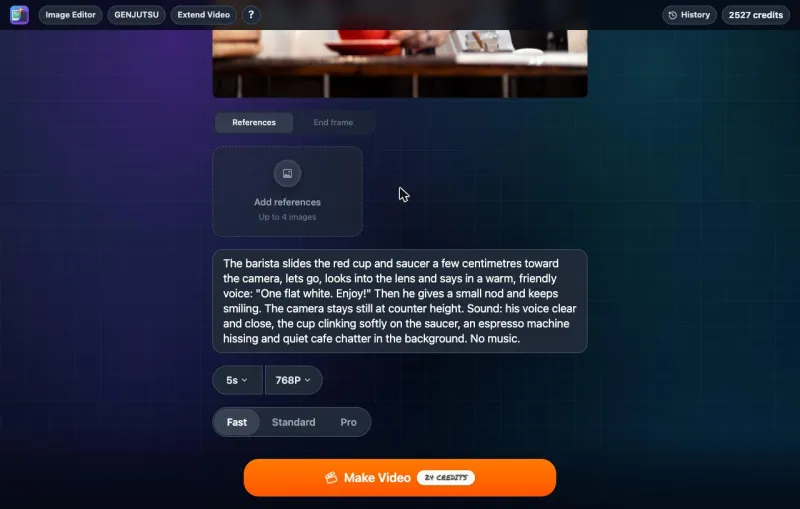
- Pick the tier: Fast, Standard or Pro.
- Pick the resolution: 480P or 768P on Fast and Standard, 768P or 2K on Pro.
- Pick the length. Use 5 seconds for a first try.
- Write your prompt: the action in order, the spoken line in quotes, what stays still, the camera and the sound.
- Check the price on Make Video, then click it.
- Watch the whole result with sound before downloading. Check the face, the hands, whether the lips match the words, and whether the line is cut off.
Try MiniMax H3 with your photo
New to image to video? Our step-by-step guide to turning a photo into an AI video covers the basics.
Reference images and end frames
Two optional extras sit under the photo in the generator. We did not test either for this guide.
- References: on Fast and Standard you can add reference images, such as extra photos of a person, an outfit or a product that the model should keep consistent. On Fast the generator allows up to 4 on top of your photo; Standard allows more. Pro does not take reference images. H3 itself can also read reference video and audio, but those are not available on Photo to Video yet.
- End frame: add a second photo and the clip aims to finish on it. This suits a planned change, such as a product turning to show its back, more than a free-moving scene.
Tested example: a barista says one line
To show an ordinary MiniMax H3 result, we ran one generation on the live site on Fast, 768P, 5 seconds. We did not retry or pick the best of several. The photo is a smiling barista handing a red cup across a café counter, 1600×1067 (about 3:2). Turn the sound on when you play the clip.
MiniMax H3 Fast: a barista with a spoken line
Original image
Generated result
Prompt used: The barista slides the red cup and saucer a few centimetres toward the camera, lets go, looks into the lens and says in a warm, friendly voice: "One flat white. Enjoy!" Then he gives a small nod and keeps smiling. The camera stays still at counter height. Sound: his voice clear and close, the cup clinking softly on the saucer, an espresso machine hissing and quiet cafe chatter in the background. No music.
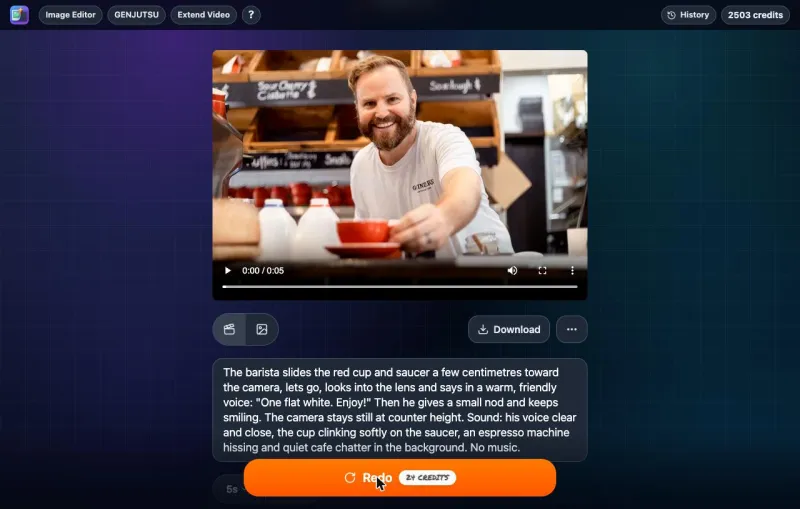
- Cost: 24 credits, the same as the price on the button.
- Time: about 20 seconds from clicking Make Video to the finished video, including the queue.
- Output: 1152×768 at 24 fps, about 5.2 seconds, with a stereo audio track. The shape matches the photo (3:2).
What happened:
- He said the line. "One flat white." comes at about 2.6 to 3.3 seconds and "Enjoy!" at about 3.9 to 4.4 seconds, and his mouth moves while he speaks. A speech-to-text check of the audio returned "One flat white. Enjoy."
- The action order worked. For the first 2 seconds he holds the cup out, then lets go, leans back, looks into the camera and smiles before he speaks.
- The cup did not really move. The prompt asked him to slide it a few centimetres forward; it stays almost exactly where it was.
- The camera stayed still. No zoom or pan.
- The background was quiet. Apart from the line there is only a low, steady room sound. We could not pick out the cup clink or the espresso machine the prompt asked for. There was no music.
What to watch out for: things the photo didn't show

He still looks like the same person at the end, with the same beard, hair and shirt; his smile just gets a little smaller. Compared with our Grok Imagine test, where the dog's face changed, this held up well.
When his arm moves away, the counter behind it fills with things the photo never showed: a blue and white box and an orange bottle next to the cup. The model has to invent whatever an arm or a head was hiding, so check the area behind any moving part before you post the clip.
This is one generation from one photo on one tier. It does not show how Standard or Pro compare, or how H3 handles long lines or 15-second clips.
Prompt ideas for MiniMax H3
These prompts are untested. They follow the same pattern as our test: one subject, actions in order, a short line in quotes, a fixed camera and a sound line.
| Photo | Prompt idea (untested) |
|---|---|
| Product intro | "She holds the bottle up next to her face, turns it so the label faces the camera and says brightly: 'This one changed my mornings.' The camera stays still. Sound: her voice close and clear, a quiet bathroom. No music." |
| Toast | "He raises his glass toward the camera and says, 'To the new place!' The friends behind him cheer and raise their glasses. The camera stays still. Sound: his voice, glasses clinking, happy chatter. No music." |
| Grandparent | "She looks up from the photo album, smiles at the camera and says softly, 'That was the summer we met.' The camera slowly pushes in. Sound: her voice, a clock ticking in a quiet room. No music." |
| Street food | "The cook flips the noodles in the wok, flames rise, and he grins at the camera. The camera stays still. Sound: loud sizzling, the clang of the wok, a busy night market. No music." |
| Beach | "A wave rolls in over the sand and slides back out. The rocks stay still. Slow push-in toward the water. Sound: the wave crashing, the hiss of water pulling back, gulls in the distance." |
What MiniMax H3 does badly
- No 1080p or 4K. Fast and Standard stop at 768P, and Pro jumps to 2K. For 1080p or 4K, see our Seedance guide.
- 2K is slow and expensive. Pro takes about two minutes and costs several times as much as Fast.
- No aspect ratio menu. The video takes your photo's shape. Crop before uploading.
- No sound-off option. Every clip has audio. If you only want the picture, mute or replace the sound after downloading.
- Small object moves can be skipped. In our test the cup barely moved even though the prompt asked for it.
- Background sounds can be faint. In our test the voice was clear but the other sounds we named were hard to hear.
- Invented details. Anything the photo does not show, such as what is behind an arm, is made up by the model.
Troubleshooting
- I can't find 2K. Switch the tier to Pro first; 2K only appears there.
- The price is higher than I expected. Check the tier, length and resolution. 5 seconds at 480P on Fast is the cheapest option.
- My video is the wrong shape. H3 uses your photo's shape. Crop the photo to 9:16, 16:9 or 1:1 before uploading.
- The line is cut off or rushed. Shorten it to one short sentence, or make the clip longer. (Untested suggestion.)
- The lips don't match the words. Use a photo where the face is clear and turned toward the camera, and keep the line short. (Untested suggestion.)
- I hear music I didn't ask for. Add "No music." to the end of the prompt.
- The person doesn't look like themselves. Ask for less movement: let them hold their pose and make one small move. (Untested suggestion.)
FAQ
Is MiniMax H3 free?
New accounts get 50 free credits, enough for three 5-second Fast clips at 480P. After that, each video costs credits. There is no subscription, and it is not unlimited.
What is the difference between MiniMax H3 Fast, Standard and Pro?
They run the same model through different hosts. Fast is the cheapest and quickest, Standard is slower and pricier with the same 768P ceiling, and Pro is the only tier with 2K.
Is MiniMax H3 the same as Hailuo 3?
It is the third generation of the Hailuo line. Hailuo 2.3 is the previous generation and is a separate entry in our model menu.
How long can a MiniMax H3 video be?
5 to 15 seconds on Fast and Standard, and 4 to 15 seconds on Pro.
Does MiniMax H3 make videos with sound?
Yes, always. Speech, sound effects and background sound are generated together with the picture, and your prompt steers them.
Can MiniMax H3 make 2K video?
Yes, on the Pro tier. A 5-second 2K clip costs 126 credits.
Is this the official MiniMax website?
No. Photo to Video is an independent product that runs MiniMax H3 through official API partners.
Ready to try it with your own photo?
Sources
- Photo to Video MiniMax H3 generator: tiers, settings and prices, checked November 1, 2026.
- One test generation on the live site, November 1, 2026, described above.